
Samsung Galaxy S26 Ultra Review: Display, Camera System, and Galaxy AI
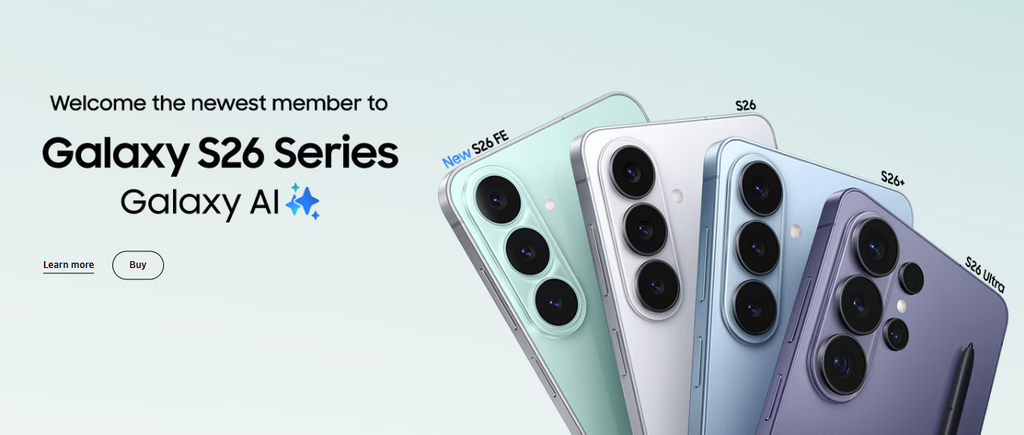
The Samsung Galaxy S26 Ultra represents Samsung’s premium approach to combining smartphone performance, photography, productivity tools, and artificial intelligence in one device. Positioned at the top of the Galaxy S series, it is designed for users who want a large display, advanced camera hardware, strong processing capability, and the flexibility of an integrated S Pen. Its appeal extends beyond headline specifications: the overall experience depends on how effectively the phone handles everyday tasks such as messaging, multitasking, capturing photographs, editing content, and managing work across applications. Samsung’s Galaxy AI features add another layer, bringing selected assistance and editing functions directly into the phone’s software. Availability of individual AI tools can depend on the software version, language, region, and supported applications. The Galaxy S26 Ultra is therefore best evaluated as a complete flagship device rather than by a single camera or processor specification. .
Samsung Galaxy S26 Ultra Design and Everyday Handling
Samsung’s Ultra series uses a large-screen design intended to accommodate intensive media use, multitasking, and stylus-based interaction. The Galaxy S26 Ultra continues that premium positioning through a substantial chassis, a high-quality finish, and a rear camera arrangement that makes its photographic hardware visually prominent. Its size gives the screen room for documents, maps, video, and side-by-side application layouts, but it also makes one-handed use less convenient than on compact phones. Users with smaller hands may need to adjust their grip when reaching the top of the display, while the phone’s dimensions can be noticeable in tight pockets. Frame and glass materials are important to the device’s premium feel, although a protective case can change its weight and thickness. The integrated S Pen distinguishes the Ultra from many competing smartphones, providing a dedicated tool for handwriting, marking up documents, and making precise selections. This feature can be valuable for students, professionals, and users who prefer writing notes by hand rather than typing every detail.
Samsung Galaxy S26 Ultra Display and Visual Experience
The display is central to the Galaxy S26 Ultra experience because it serves as the main interface for photography, streaming, gaming, reading, and productivity. Samsung’s flagship phones are known for high-resolution AMOLED panels, strong contrast, rich colour reproduction, and adaptive refresh rates designed to keep movement smooth while managing power consumption. The large display format gives users more room to review photographs, edit video timelines, work with spreadsheets, and read lengthy documents without constantly zooming or scrolling. High peak brightness can also improve outdoor visibility, although reflections, viewing angles, screen settings, and direct sunlight still affect readability. Adaptive refresh technology can make scrolling and interface animations feel fluid, while the ability to adjust colour and brightness preferences helps users tailor the display to different environments. A vivid default colour profile may suit entertainment and general use, but people working with colour-sensitive images may prefer a more controlled setting.
Samsung Galaxy S26 Ultra Camera Performance and Video Tools
Photography is one of the Galaxy S26 Ultra’s main selling points, with a multi-camera system designed to cover everyday snapshots, landscapes, portraits, distant subjects, and video recording. Samsung specifies a 200-megapixel main camera, supported by an ultra-wide camera and telephoto lenses for different fields of view. This arrangement offers more flexibility than a phone relying on a single rear camera, particularly when photographing architecture, travel scenes, or subjects that are difficult to approach. High-resolution capture can preserve fine detail in suitable lighting, while computational processing helps balance exposure and colour across challenging scenes. Telephoto hardware is useful for framing distant subjects, although results at longer zoom levels depend on lighting, movement, and the amount of digital enlargement involved. Samsung also highlights wider camera apertures and improved noise reduction for low-light video compared with the previous Ultra generation. The front camera includes an AI image signal processor intended to produce more natural-looking selfies.
Samsung Galaxy S26 Ultra Performance and Multitasking
The Galaxy S26 Ultra uses Qualcomm’s Snapdragon 8 Elite Gen 5 for Galaxy processor, a customised platform designed for Samsung’s flagship devices. It is intended to handle demanding applications, high-refresh-rate gaming, image processing, multitasking, and on-device AI functions. Performance is not determined by processor speed alone, however; memory configuration, software optimisation, application demands, and thermal management also influence how responsive the phone feels over time. Samsung says the redesigned vapour chamber improves thermal performance by 21% compared with the Galaxy S25 Ultra, helping spread heat more evenly during demanding workloads. That improvement may support more consistent performance during extended gaming, video editing, or other intensive tasks, although temperature and sustained speed still depend on the environment and workload. Storage choices include 256GB, 512GB, and 1TB configurations, with RAM capacity varying by version; the 1TB model is listed with 16GB of memory, while lower-storage configurations offer 12GB.
Samsung Galaxy S26 Ultra Galaxy AI and Privacy Display
Galaxy AI is integrated into the Galaxy S26 Ultra through features designed to assist with content editing, search, communication, and everyday tasks. Photo Assist provides tools for modifying images, while other AI functions can help users work with information and interact with supported applications. The usefulness of these tools depends on the task: an editing feature can simplify a quick adjustment, but generated or altered content may still require review for accuracy and visual consistency. Some functions require a Samsung Account, an internet connection, or compatible software, and availability varies by country, language, carrier, and application. Samsung states that its basic Galaxy AI features are free, while future enhanced services or third-party AI functions may be governed by different terms. Users should therefore avoid assuming that every advertised capability will work identically in every region or remain free indefinitely. A notable hardware feature is Privacy Display, which is designed to limit side-angle visibility so that people nearby have more difficulty viewing selected screen content.
Samsung Galaxy S26 Ultra Battery, Charging, and Connectivity

Battery life on a large flagship depends on more than its rated capacity: display brightness, mobile signal strength, gaming, camera use, navigation, and background activity all influence how long a charge lasts. The Galaxy S26 Ultra is designed for full-day use across a mixture of communication, entertainment, photography, and productivity, but heavy workloads can require an earlier recharge. Samsung introduces Super Fast Charging 3.0 on this generation, giving users a faster wired charging option than older supported Galaxy devices. Charging speed in practice depends on the compatible power adapter, cable, temperature, and the phone’s current battery level. The included box contents list the phone, data cable, and SIM-ejection pin; a travel adapter is not included, so buyers may need to use a compatible charger or purchase one separately. Wireless charging can provide convenient top-ups where supported, while USB-C remains useful for wired charging and data transfer.
Samsung Galaxy S26 Ultra Price and Overall Value
The Galaxy S26 Ultra occupies the premium end of Samsung’s smartphone range, and its price reflects the combination of display technology, advanced cameras, flagship processing, S Pen support, and Galaxy AI features. Samsung India’s online store lists different prices according to storage, colour, and promotional conditions. At the time of checking, listings showed the 256GB model at approximately ₹1,30,999 under a promotional offer, while another product listing displayed ₹1,54,999; prices and discounts can change, so buyers should verify the final amount at checkout. The 512GB and 1TB versions cost more, making storage selection an important part of the budget decision. Exchange offers, reward points, financing, and Samsung Care+ may affect the total purchase calculation, but these benefits depend on eligibility and current terms. The S26 Ultra is most compelling for people who will use its camera versatility, large screen, stylus, high performance, and newer software features regularly.