
ProtoArc EM11 NL Review: A Vertical Ergonomic Mouse for Everyday Desk Work

The ProtoArc EM11 NL is a wireless vertical mouse from ProtoArc, a brand focused on ergonomic input devices for people who spend long stretches at a computer. It does not reinvent the category. It applies the familiar idea of tilting the hand into a handshake position so the forearm does not twist flat against the desk. It adds an extended wrist rest, rechargeable power, and pairing with up to three devices, which places it in the practical middle of the vertical mouse market rather than at the premium end. Retail listings carry it under several variations of the same name, and marketplace data shows it has been on sale since 2024. That track record makes it a reasonable subject for a detailed look, since specifications, user feedback, and pricing have had time to settle. The sections below examine how the ProtoArc EM11 NL is built, how it connects, how it performs, and which kinds of users are most likely to benefit from it.
ProtoArc EM11 NL Design and Build
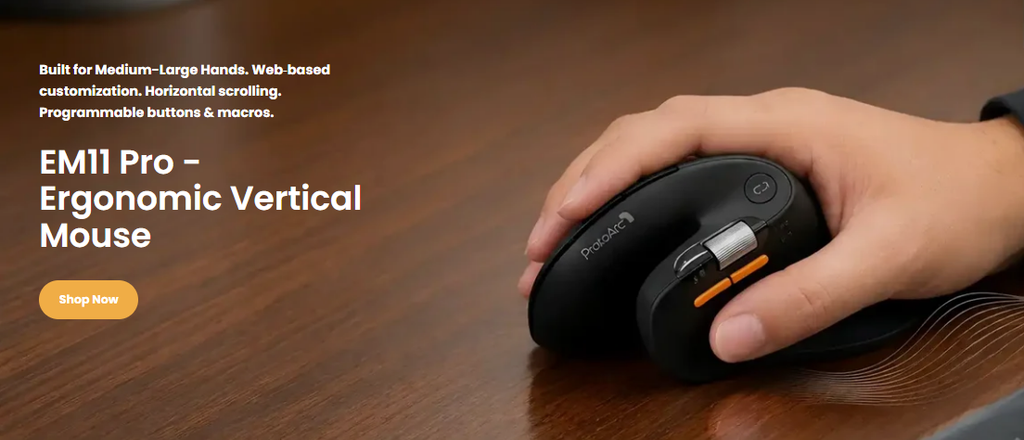
The shape of the ProtoArc EM11 NL follows vertical-mouse logic. The body stands upright, the thumb rests on a sloped side, and the palm sits against a raised surface instead of lying flat. Listed dimensions are about 138 by 69.2 by 68.1 millimetres, and the weight is roughly 112 grams, which is light enough for long sessions yet substantial enough to feel stable. A striped, non-slip texture on the grip area is meant to keep the hand from sliding, while the extended wrist rest supports the heel of the palm. Black is the most common colour, and some listings also show blue and grey variants. The mouse is built for right-handed users only, which excludes left-handed buyers entirely. The brand also states that the body suits hand lengths under 7.5 inches, so people with larger hands may find it cramped. This size guidance appears prominently in product listings. It signals that the EM11 NL is tuned for small to medium hands rather than for universal fit.
ProtoArc Ergonomic Approach and Adjustment Period
The central claim of the EM11 NL is reduced wrist strain compared with a standard mouse. The reasoning matches how vertical mice are generally designed: holding the forearm in a more neutral orientation lowers the twisting that a flat mouse forces. ProtoArc frames the benefit in terms of lower fatigue and a reduced risk of repetitive strain, though the wording stays cautious and no clinical outcome is promised. The brand is also open about the learning curve and recommends one to two weeks of regular use before judging the shape. That advice is realistic, because muscle memory built on a flat mouse tends to produce imprecise pointing at first. ProtoArc also asks users to relax the palm instead of gripping tightly, since a tense hold can cancel the benefit of the angled posture. For people who already have pain, the mouse is best treated as one adjustment among several, alongside desk height, chair position, and regular breaks, rather than a standalone remedy.
ProtoArc Connectivity and Multi-Device Switching
The EM11 NL supports two Bluetooth channels and a 2.4 GHz wireless mode, so up to three devices can stay paired at once. A button on the underside cycles through the BT1, BT2, and 2.4G slots, which suits someone moving between a laptop, a tablet, and a desktop. The USB receiver is Type-A and sits in a compartment on the bottom of the mouse. The listing states plainly that no USB-C receiver is included, so owners of recent thin laptops should rely on Bluetooth or carry an adapter. Stated wireless range is 10 metres, which is more than enough for a desk setup. Compatibility covers Windows 8 and later, macOS 10.12 and later, and Android 4.3 and later. Marketplace descriptions mention Bluetooth 4.0 in some places and 5.0 in others, so buyers who care about the exact version should check the specific listing. Switching is manual, and there is no automatic cursor handoff between screens.
ProtoArc Tracking, DPI, and Click Behaviour
Tracking relies on an optical sensor with three DPI levels of 1000, 1600, and 2400, selectable with a dedicated button. The range is modest next to gaming mice, but it suits office work, spreadsheets, browsing, and general photo editing, where excessive sensitivity tends to hurt accuracy. The left and right buttons are rated for more than three million clicks and are described as silent, which can matter in shared offices, libraries, or households. The brand notes that the scroll wheel and the forward and back buttons still make normal noise. Five buttons are present in total, but none can be reprogrammed, and the forward and back buttons do not work on macOS. These are the clearest functional trade-offs of the EM11 NL, because no companion software exists for remapping. Users who rely on custom shortcuts or Mac navigation may find the fixed layout restrictive. Windows users who simply want browser navigation will probably have everything they need.
ProtoArc Battery Life and Charging
Power comes from a built-in 500 mAh lithium-ion battery, recharged through a USB-C cable included in the box. According to the listing, that cable is intended for charging purposes. ProtoArc markets the capacity as large for the category, and a 500 mAh cell is generous for a mouse with a simple optical sensor and no lighting effects. Real runtime depends on usage habits and connection mode. The retailer data reviewed here does not provide a single verified endurance figure, so buyers should treat any specific hours claim cautiously unless it comes from the official product page. A sealed battery also means there are no spare cells to swap, and gradual capacity loss eventually becomes a consideration over several years of use. On the positive side, a rechargeable design avoids the recurring cost and waste of disposable batteries. For people who forget to charge their devices, the lack of any stated wired operating mode is a point worth weighing.
ProtoArc Pricing and Market Position
United States retailer listings place the EM11 NL anywhere from the mid-twenties to the high-forties in dollars. One major listing showed $26.99, while a third-party seller on another marketplace asked close to $49. A European retailer sells the mouse under the EM11 name with free shipping above 50 euros, and an Australian marketplace listing shows prices above 100 Australian dollars, reflecting import shipping. These gaps show that pricing depends heavily on seller and region. Within that range, the mouse competes in the budget-to-mid segment of vertical mice. Rivals from better-known peripheral makers often cost more but add programmable buttons, companion software, and wider size options. The advantage of ProtoArc is that it bundles a wrist rest, tri-mode connectivity, and quiet clicking at a low price. The disadvantage is narrower feature depth, with fixed buttons and no left-handed version. Stock also fluctuates, and at least one listing showed backorder status, so availability should be confirmed before purchase.
ProtoArc Suitability and Buying Considerations
The EM11 NL fits office workers, students, writers, and remote professionals with small to medium hands who want a lower-cost entry into vertical mice and who move between several devices. Quiet clicking helps in shared spaces, and three-way pairing reduces the need for separate peripherals. It is a weaker match for left-handed users, people with larger hands, gamers, designers who depend on programmable shortcuts, and Mac users who need working back and forward buttons. Measuring hand length before ordering is sensible given the brand’s own guidance. Return terms deserve attention as well, since several retailers show 30-day returns, which gives time to get through the adjustment period. Buyers should also confirm the receiver type against their computer’s ports and check warranty details with the seller, because listings direct customers to the seller or the manufacturer for coverage. The value of this ProtoArc model depends largely on whether its hand-size and button limitations match the person using it.